
# How to Delete Content?
- The Deleting Content feature allows you to remove unnecessary files from the Assets efficiently.
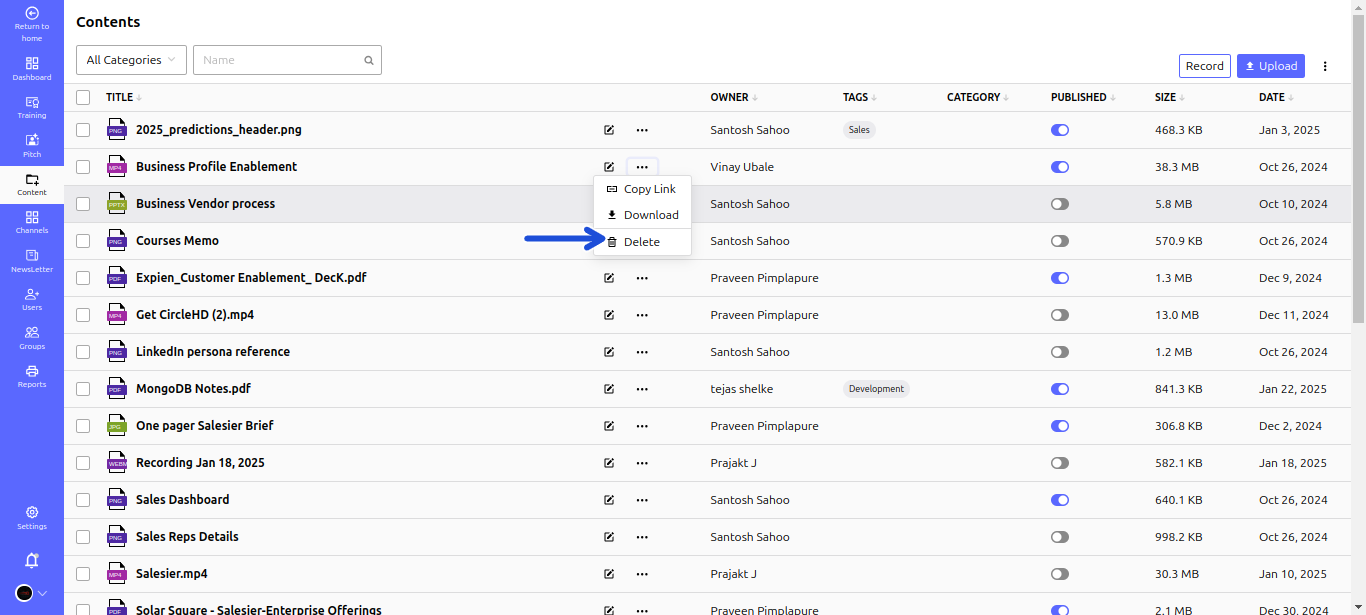
# Step-by-Step Guide to Deleting Content
- Step 1: Open the Assets:
- Navigate to the Assets where all stored files are listed.
- Step 2: Locate the Content:
- Find the file or document you wish to delete.
- Click the Three Dots (⋮) next to the content to open the action menu.
- Step 3: Initiate Deletion:
- Select the Delete button (trash icon) from the dropdown menu.
- Step 4: Confirm the Action:
- A confirmation popup will appear.
- Click Confirm/Delete to permanently remove the content.
⚠️ Important: Deleted content cannot be recovered. Double-check before confirming the deletion.