
# Enrollments - Admin Guide
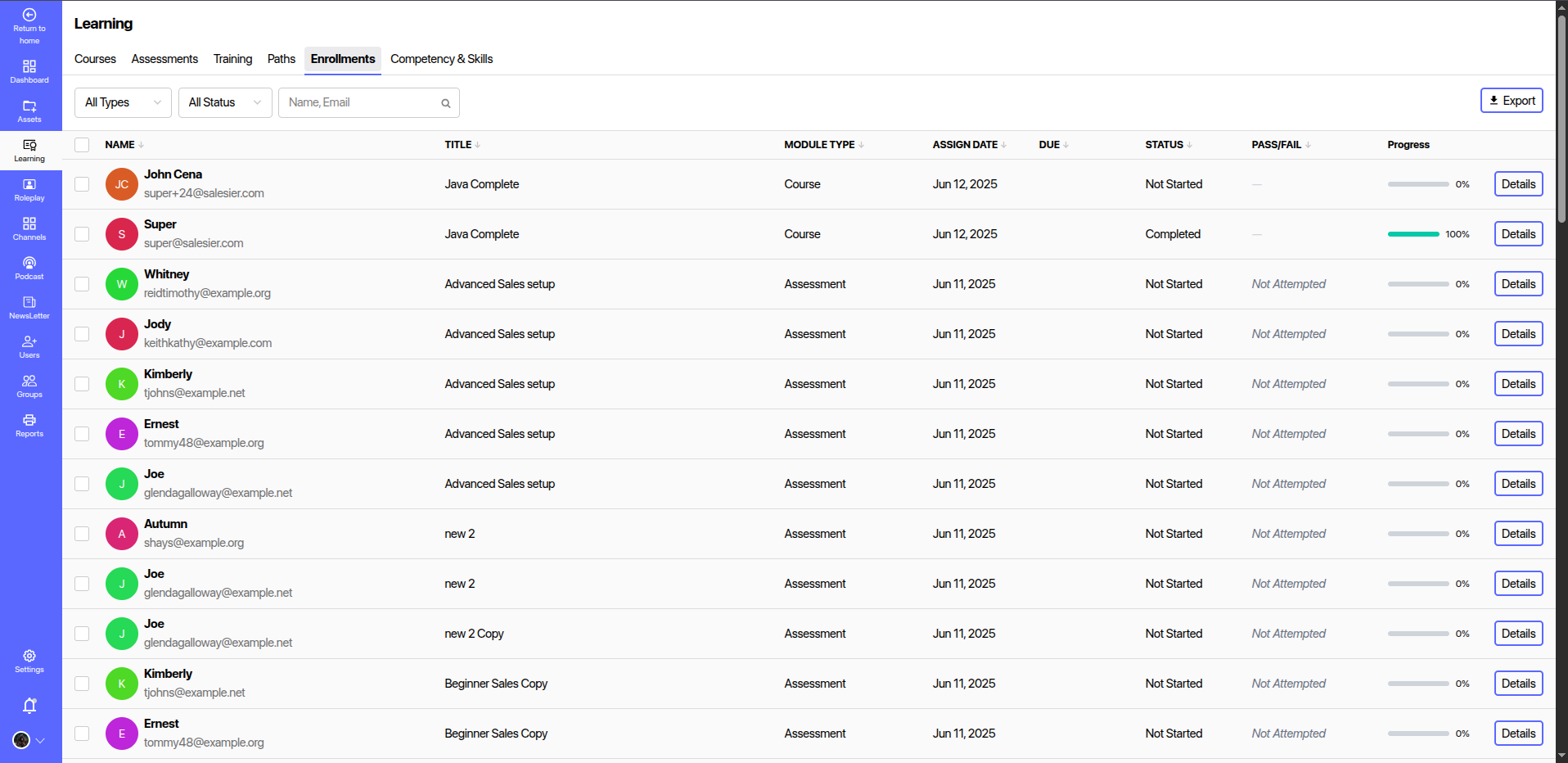
The Enrollments section under the Learning module provides a centralized view for managing user participation in various learning modules such as Courses, Assessments, and Training Sessions. It helps administrators assign, monitor, and track the progress of learners across all content types.
# 📋 Overview
Each row in the Enrollments table displays:
- Name: Learner’s name and email.
- Title: The title of the enrolled module (e.g., course, assessment).
- Module Type: Indicates whether the module is a Course or Assessment.
- Assign Date: Date when the module was assigned to the user.
- Due Date: Target completion date.
- Status: Current progress status (Not Started, In Progress, Completed).
- Pass/Fail: Status for assessments.
- Progress: Completion percentage.
- Details: Button to view detailed progress and actions.
# ✅ Use Cases
- Monitor user engagement with assigned learning materials.
- Evaluate assessment attempts and completion rates.
- Identify at-risk learners and trigger interventions.
- Align assignment patterns with roles, teams, or skill levels.
# 🔐 Permissions
Only users with Admin or Learning Manager roles can access and modify enrollments.
Keep learner progress visible and actionable — ensure no one falls behind with proactive enrollment monitoring.