
# How to create a new scenario?
The Roleplay module is designed to facilitate simulated conversation scenarios for skill development and evaluation. Admins can create roleplay scenarios to train and assess users on various competencies such as communication, product knowledge, and negotiation skills.
# 📘 Overview
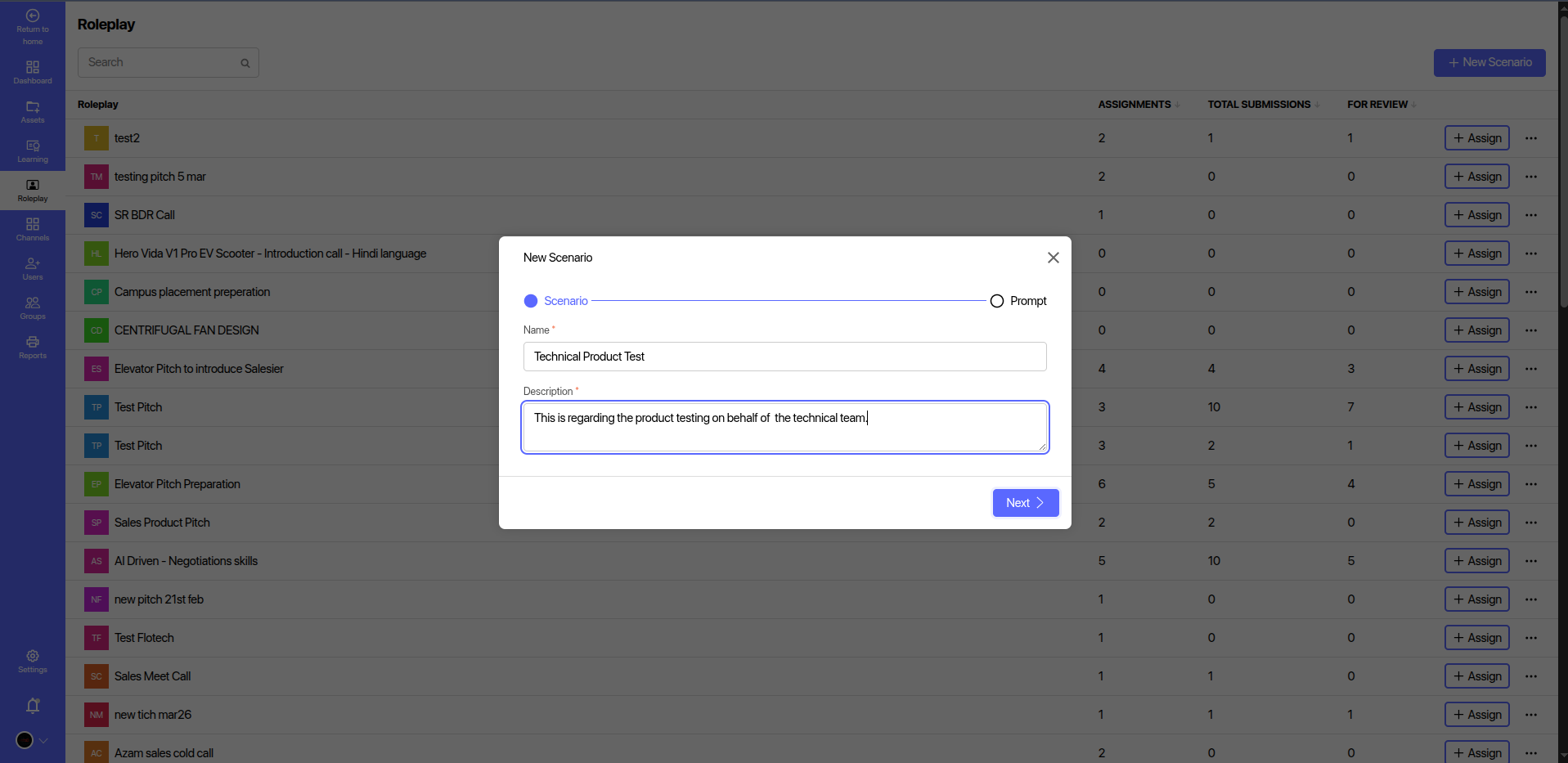
The Roleplay section provides:
- A list of all existing roleplay scenarios.
- The ability to create new scenarios or prompts.
- Metrics for each roleplay including:
- Assignments: Number of times the scenario is assigned.
- Total Submissions: Number of times users have submitted responses.
- For Review: Pending submissions awaiting evaluation.
# 
# ➕ Creating a New Scenario
To create a new roleplay scenario, follow these steps:
Click on
+ New Scenario(top right).Choose Scenario Type:
Scenario: For creating predefined scripts.Prompt: For open-ended or dynamic response prompts.
Fill in the Basic Details:
- Name: Enter a relevant title (e.g.,
Technical Product Test). - Description: Provide a short context or purpose for the roleplay.
Example:This is regarding the product testing on behalf of the technical team.
- Name: Enter a relevant title (e.g.,

Script/Instructions:
Add instructions or a script for the participant.
Example:
Instructions: Provide the best of the skills regarding technical skills for the production.Attach Resources (Optional):
- Upload reference materials, such as PDFs or documents (e.g.,
Product Basics).
- Upload reference materials, such as PDFs or documents (e.g.,
Skills Tags:
- Add tags to indicate what skills the scenario aims to evaluate (e.g.,
Communication skill,Test Skill).
- Add tags to indicate what skills the scenario aims to evaluate (e.g.,
Target Duration:
- Specify the expected duration in minutes (e.g.,
10).
- Specify the expected duration in minutes (e.g.,
Draft Option:
- Toggle the Draft switch if you do not want to publish the scenario immediately.
Click
Saveto create the scenario.
# 🔍 Roleplay Table Columns
| Column Name | Description |
|---|---|
| Roleplay | Title of the scenario |
| Assignments | Total number of users the scenario is assigned to |
| Total Submissions | Total response submissions by users |
| For Review | Pending reviews requiring admin evaluation |
# ✅ Best Practices
- Use clear and concise instructions to ensure users understand the task.
- Assign relevant skill tags to categorize the roleplay.
- Review user submissions regularly to provide feedback.
- Use prompts for open-ended assessments or AI-generated feedback cases.
# 🛠️ Use Cases
- Sales Training: Cold calls, elevator pitches, objection handling.
- Technical Evaluation: Product demos, technical walkthroughs.
- Customer Support: Handling complaints, onboarding sessions.
For any issues or feedback, please contact the LMS administrator or the product team.