
# Creating an Assessment Using AI
Leverage AI-powered assessment creation to generate high-quality evaluations quickly and efficiently. AI helps create relevant, engaging, and objective-based assessments while reducing manual effort.
# Steps to Create an AI-Generated Assessment
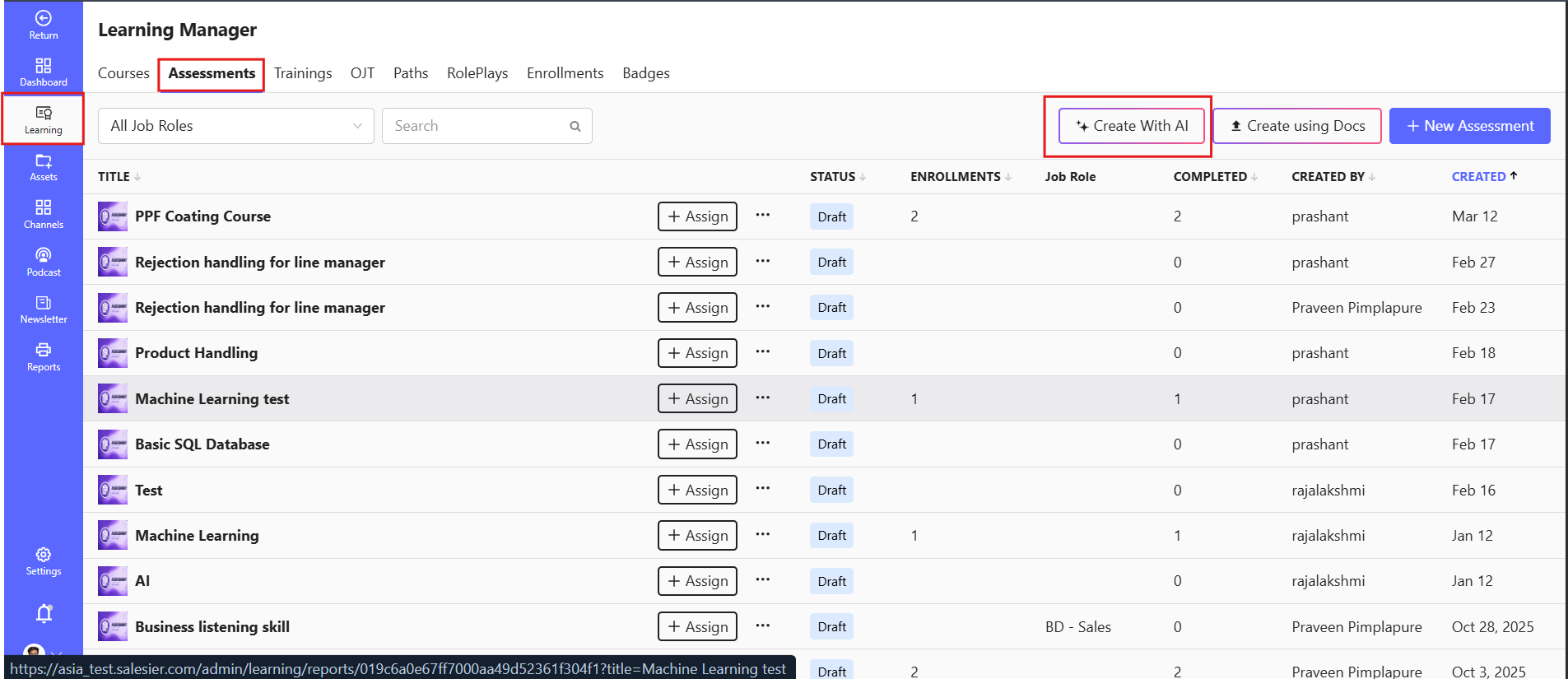
1️⃣ Navigate to Learning > Assessments.
2️⃣ Click "Create with AI".
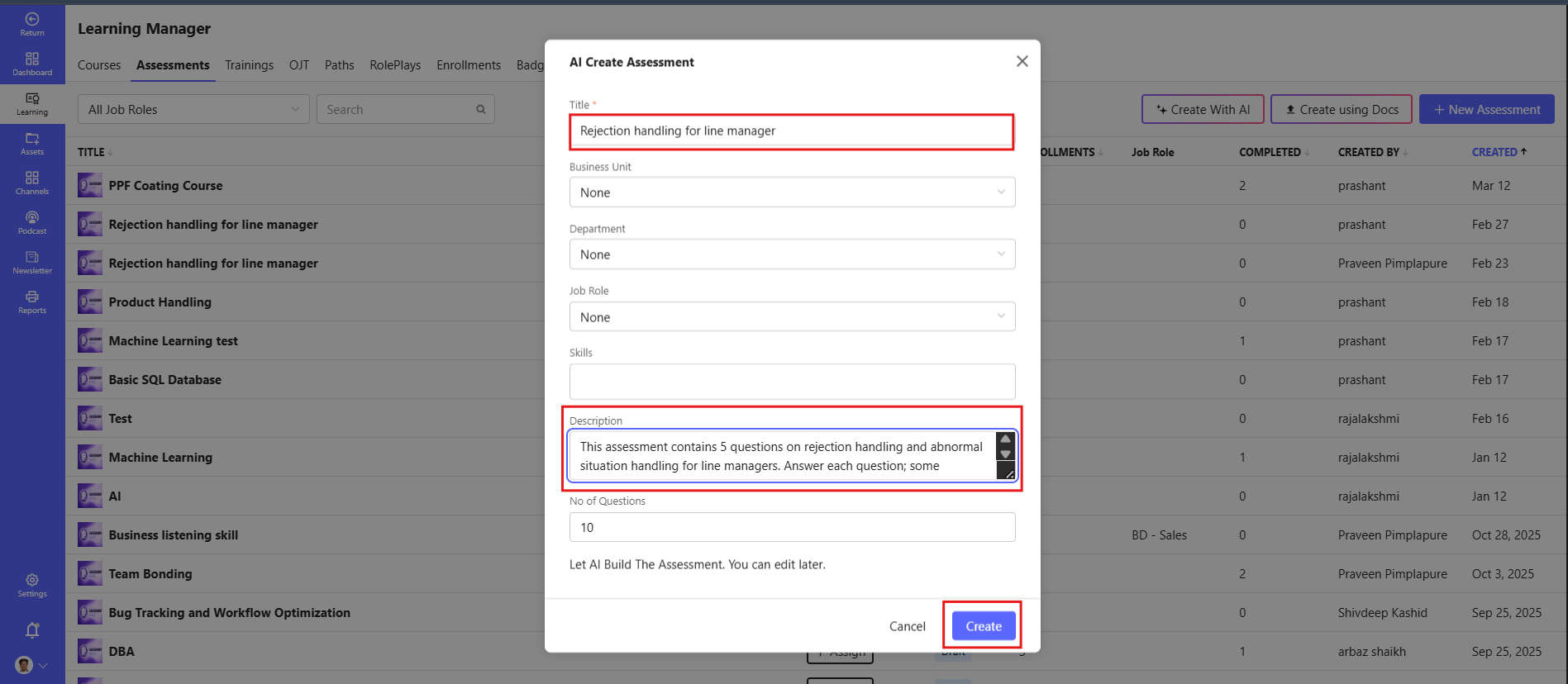
3️⃣ Enter the Title of the assessment.
4️⃣ Add relevant Skills to align with learning objectives.
5️⃣ Provide a brief Description of the assessment.
6️⃣ Specify the Number of Questions you want to generate.
7️⃣ Click Create to generate the assessment instantly.
# Supported Question Types
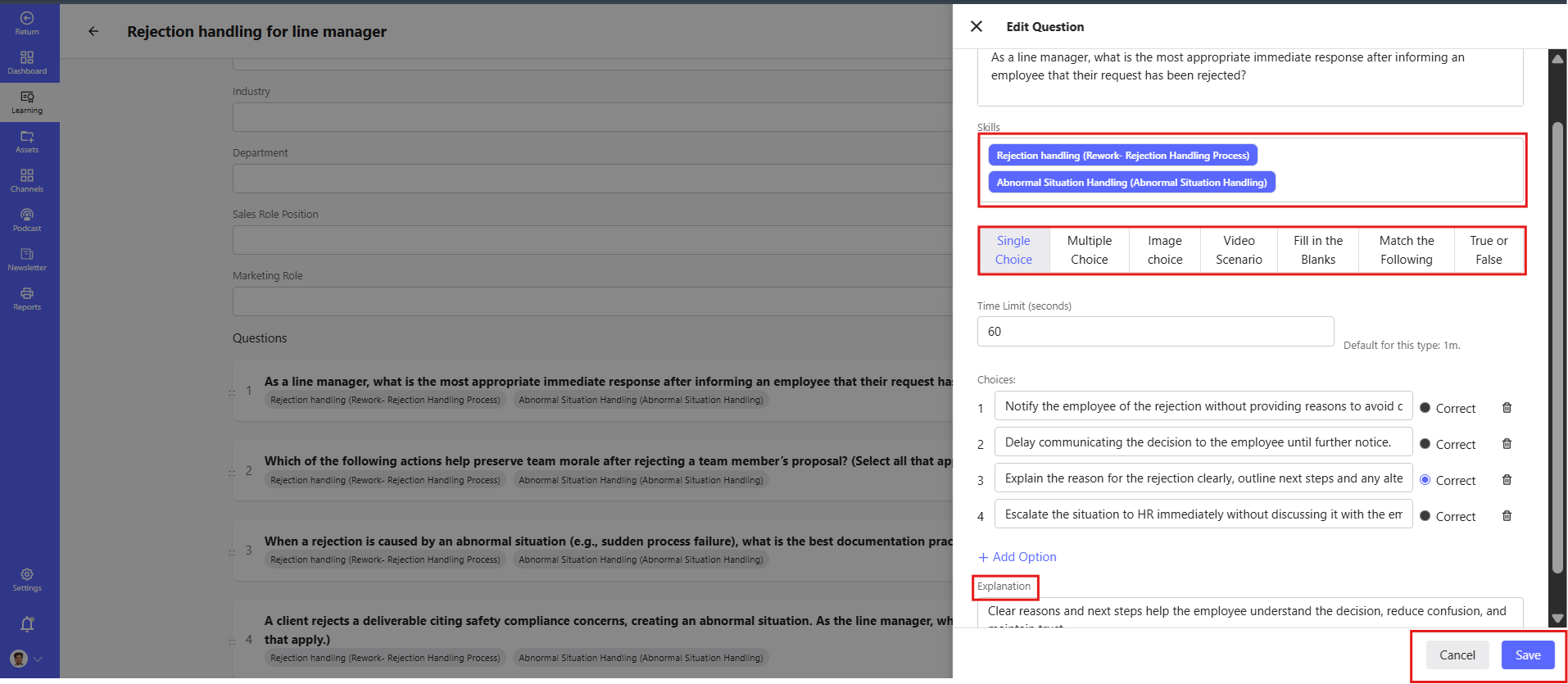
The platform supports multiple question formats to assess knowledge, skills, and decision-making abilities effectively.
Single Choice Question :- Learners select one correct answer from multiple options.
Multiple Choice Question :- Learners can select more than one correct answer.
True or False :- Learners determine whether a statement is correct or incorrect.
Fill in the Blank :- Learners enter the missing word, phrase, or value.
Match the Following :- Learners match related items from two columns.
Image Choice Question :- Learners select the correct image from multiple image options.
Video Scenario Question :- Learners watch a video and answer questions based on the scenario presented.
# Assessment Settings
# Duration (in Minutes)
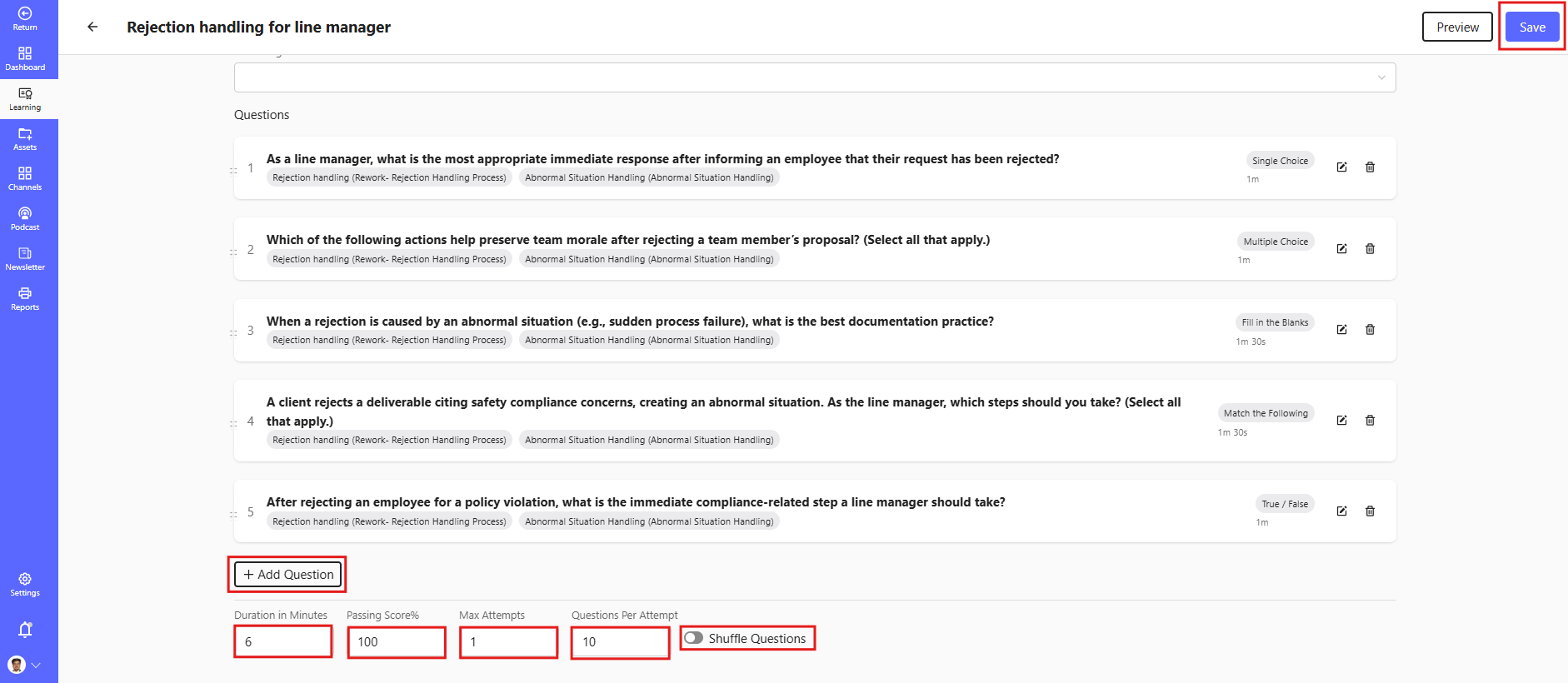
The Duration setting defines the total time allotted for learners to complete the assessment.
- Enter the duration in minutes.
- The assessment timer starts when the learner begins the assessment.
- Once the time limit is reached, the assessment will be automatically submitted.
- Helps ensure consistency and time-bound evaluation.
Example: 30 Minutes, 45 Minutes, 60 Minutes
# Passing Score (%)
The Passing Score determines the minimum percentage a learner must achieve to successfully pass the assessment.
- Enter the required passing percentage.
- Learners scoring below the defined percentage will be marked as failed.
- Useful for certification, compliance, and skill validation programs.
Example: 70%, 80%, 90%
# Max Attempts
The Max Attempts setting controls the number of times a learner can attempt the assessment.
- Restrict the number of retries allowed.
- Helps maintain assessment integrity and learning standards.
- Can be configured based on organizational policies.
Example: 1 Attempt, 3 Attempts, 5 Attempts
# Questions Per Attempt
The Questions Per Attempt setting determines how many questions are displayed to the learner during each assessment attempt.
- Questions can be selected from the complete assessment or a question bank.
- Supports randomized question delivery.
- Provides a unique assessment experience for each attempt.
Example: Display 10, 20, or all available questions.
# Shuffle Questions
The Shuffle Questions option randomizes the order of questions for each learner attempt.
- Reduces the chances of answer sharing.
- Creates a unique assessment experience for every learner.
- Improves assessment security and fairness.
Note: When enabled, questions will appear in a different sequence for each attempt while maintaining the same scoring criteria.
# 🖋 How to Write the Best Prompts for Assessment Creation
To get the most accurate and useful assessments, follow these guidelines:
✅ Be clear and specific about the topic
- ❌ Create a quiz on sales
- ✅ Create an assessment on negotiation techniques for beginner sales professionals with scenario-based questions.
✅ Define the difficulty level
- ✅ Beginner, intermediate, or advanced.
✅ Mention question type and format
- ✅ Include multiple-choice and single-choice questions with explanations.
✅ Specify the number of questions
- ✅ Generate 10 questions, including at least 3 scenario-based questions.
✅ Include key concepts or skills to assess
- ✅ Focus on active listening, objection handling, and closing techniques.
# 📌 Example Prompts for Different Domains
# Sales Assessment
"Create a 10-question assessment for beginner sales professionals on prospecting, negotiation, and closing techniques. Include multiple-choice and scenario-based questions with correct answers and explanations."
# Leadership & Management Assessment
"Generate an assessment with 8 questions for mid-level managers on decision-making, team leadership, and conflict resolution. Use multiple-choice and situational judgment questions."
# Technical Skills Assessment
"Create a 12-question quiz on cloud computing fundamentals, covering core concepts, deployment models, and security. Include multiple-choice and single-choice questions with answers."
# Soft Skills Assessment
"Generate an assessment for corporate employees on effective communication skills, including active listening and presentation techniques. Include 10 multiple-choice questions with explanations."
# 🚀 Benefits of AI-Powered Assessment Creation
✅ Saves time – Instantly generate relevant questions
✅ Ensures alignment – Tailor assessments to course objectives
✅ Enhances engagement – Create diverse question types
# ✅ Pro Tip:
For the best results, write prompts that clearly define:
- Topic or subject area
- Target audience
- Question types
- Number of questions
- Skills or concepts to be assessed
The more detailed your prompt, the more accurate and relevant the generated assessment will be.